Wallet Setup
Install a Web3 wallet, get some BNB and USDT, and connect to Trustfy.
Everything on Trustfy starts with a . It's the app that holds your USDT and BNB, and it's what you use to prove “this is really me” when you trade — no username or password required.
Expected time
9 minutes
Difficulty
Beginner
You'll need
A phone or computer, 10 minutes, A little BNB (a few dollars)
What a wallet actually does#
Think of a wallet as a hybrid of a banking app and a signature pad. It shows your balances, and every time an action needs your approval — connecting to Trustfy, funding a trade, releasing funds — your wallet pops up and asks you to approve or reject it. Nothing happens without that approval.
Unlike a bank account, nobody — not Trustfy, not your wallet provider — can freeze it, reverse a transaction, or access it without your permission. That freedom comes with a tradeoff: if you lose access to your wallet, nobody can recover it for you either. That's why the next section matters.
Your seed phrase: the one thing to protect#
Never share this with anyone
Your works the same way — it's just a different form of the same secret. Same rule applies: never share it, ever.
- Storing your seed phrase in a photo, note app, or cloud drive — all of these can be hacked or synced somewhere you don't control.
- Typing your seed phrase into any website, including one that looks like Trustfy — Trustfy's real wallet connection never asks for it.
- Sharing a screenshot of your seed phrase in a support chat, even with someone claiming to be Trustfy staff.
BNB Smart Chain, USDT, and BNB#
Trustfy runs on a single blockchain: BNB Smart Chain (BSC). Every wallet, every transaction, and every fee on Trustfy happens there — no other network works.
- USDT (BEP20) is the asset you actually trade — a stablecoin designed to track $1 USD, issued in the BSC-native BEP20 format.
- BNB is BSC's native currency, used only to pay small network fees (see the Gas guide) — it's not what you're trading.
Choosing a wallet#
Trustfy supports several wallets, all of which work with BNB Smart Chain out of the box:
| Wallet | Best for | Platform |
|---|---|---|
| Trust Wallet | Easiest first wallet, all on your phone | iOS, Android |
| MetaMask | The most widely used browser wallet | Browser extension, mobile |
| Rabby | Extra pre-transaction risk warnings | Browser extension |
| WalletConnect | Connecting almost any other mobile wallet via QR code | Mobile (any WalletConnect-compatible app) |
Installing a wallet#
Using Trust Wallet on mobile as the example — the other wallets follow the same shape:
- 1
Download the official app
Get it from the App Store or Google Play — search “Trust Wallet” and confirm the publisher before installing. Never install a wallet from a link sent to you in chat.
- 2
Create a new wallet
Choose “Create a new wallet,” not “I already have a wallet,” the first time.
- 3
Write down your seed phrase
You'll be shown 12 words. Write them on paper, in order, and store them somewhere private. Do not screenshot them.
- 4
Confirm your seed phrase
The app will ask you to re-enter the words to prove you saved them correctly.
- 5
Get a little BNB
Use the wallet's built-in “Buy” option, or send BNB in from an exchange you already use — the equivalent of a few dollars is enough to start.
Back up your Secret Recovery Phrase
Write these 12 words down, in order. Never share them or type them into a website.
Connecting your wallet to Trustfy#
- 1
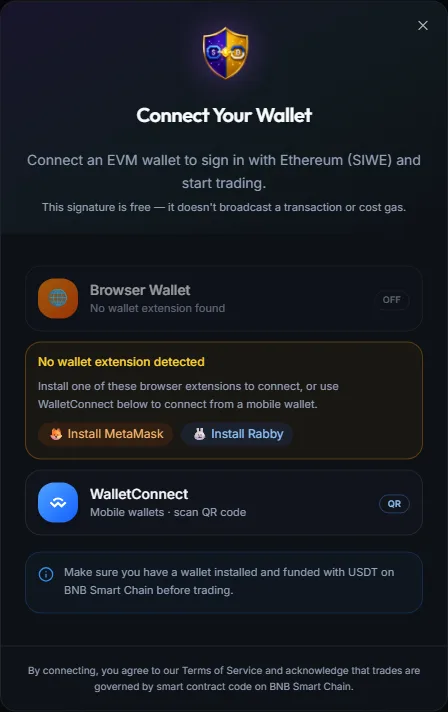
Click Start Trading / Connect Wallet
On the Trustfy homepage or app, click the wallet button in the top-right corner.
- 2
Pick your wallet
Choose MetaMask, Rabby, Trust Wallet, or WalletConnect (for everything else). If you're on mobile with Trust Wallet installed, it opens directly inside the app.
- 3
Approve the connection
Your wallet opens and asks whether to share your wallet address with Trustfy — this is just an address, not access to your funds. Approve it.
- 4
Sign a message to verify it's you
This is called . Your wallet will show a short, human-readable message and ask you to sign it. Signing this message is free (no gas) and does not move any funds — it's the equivalent of typing in a password, except nobody can steal it because it's different every time.
- 5
You're in
Your dashboard loads, showing your wallet address in the header. You're now connected and ready to browse or trade.
If your wallet is on the wrong network#
Wrong network is the #1 first-time snag
Disconnecting or switching wallets#
Click your address in the header to open the account menu, where you can disconnect or switch to a different wallet at any time. Disconnecting doesn't cancel any open trades or ads — those live on the blockchain and reappear as soon as you reconnect the same wallet.
Can I use one wallet on two devices? Yes — import the same seed phrase into your wallet app on the second device to see the same funds and history everywhere.
What if I lose my phone? As long as you still have your seed phrase, you can restore your wallet on a new device. Without the seed phrase, the funds are unrecoverable — which is exactly why backing it up safely matters so much.
Is connecting a wallet the same as giving Trustfy access to my funds? No. Connecting only shares your public address and asks for a free signature to log in. Trustfy can never move your funds without you separately approving each specific transaction.
Related guides