
Creating an Advertisement
Publish a buy or sell ad, field by field — and how to pause, edit, or close it later.
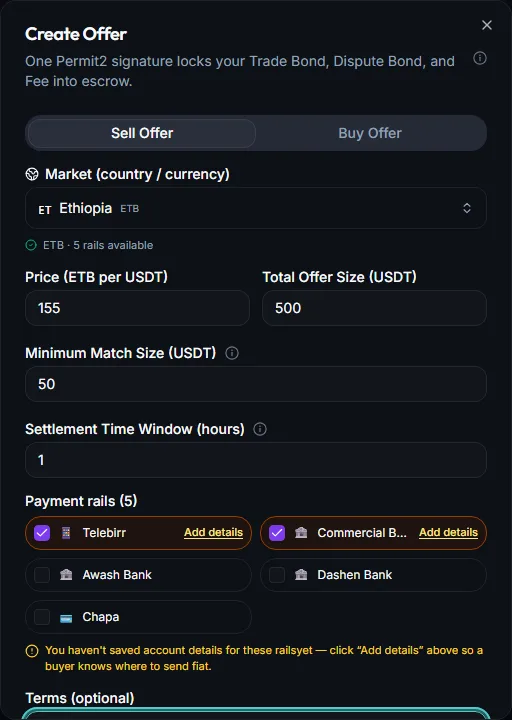
An advertisement (“ad” for short) is your public offer to buy or sell USDT at a price and terms you choose. Publishing one takes a single wallet signature — this guide covers every field you'll see, plus how to change or take down an ad later.
Expected time
8 minutes
Difficulty
Intermediate
You'll need
A connected wallet, USDT to sell (for sell ads), A little BNB for gas
Every field, explained#
- 1
Market (country / currency)
Pick the local currency and payment rails you want to trade against — this determines which traders can see and match your ad.
- 2
Price
The rate you're offering, in your chosen currency per 1 USDT. This is a rate you set manually — enter a number close to the going market rate so your ad is competitive.
- 3
Trade Amount
The total size of your ad in USDT — this also acts as the maximum a single trade against your ad can be, unless it's already been partly matched down.
- 4
Minimum Match Size
The smallest amount, in USDT, that a taker is allowed to match in one trade. Setting this too high can shut out smaller traders; too low can invite many tiny trades that each cost you a little gas.
- 5
Settlement Time Window
How long a buyer has to pay after a trade is funded, and how long a seller has to review after the buyer marks it paid. Shorter windows move faster but leave less room for slow payment rails; longer windows are more forgiving.
- 6
Payment rails
Check every payment method you're willing to accept or send through for this market (bank transfer, mobile money, etc.) — the more you support, the more traders can match you.
- 7
Terms (optional)
A short free-text note — e.g. “Fast release on confirmation” or “Please include your name in the transfer note.” Keep it specific and actionable.
Bonds and fees, shown before you sign#
Before you publish, Trustfy shows a breakdown of exactly what's being locked: your Ad Bond, Dispute Bond, and maker fee — each as a separate line item, calculated from your trade amount. All three are bundled into the single signature you approve to publish.
Good to know
Publishing#
- 1
Review the summary
Double-check price, amount, limits, and the bond/fee breakdown.
- 2
Sign once
Your wallet opens with a single request bundling the bond, dispute bond, and fee. Approve it.
- 3
Ad goes live
Your ad appears in the marketplace immediately, status Open, ready to be matched.
Editing an advertisement#
You can edit an ad's price, terms, and payment rails only before it receives its first match. Open it from My Offers and choose Edit — changes save without a new signature since they don't touch anything already locked on-chain.
| Action | What happens |
|---|---|
| Edit | Change price, terms, or payment rails. Only available before the ad's first match. |
| Cancel | Takes the ad down entirely. Your Ad Bond is refunded in full within your free cancellation allowance — see Bonds & Fees. |
| Fully matched | Once every USDT on the ad has been matched, it closes automatically — no action needed from you. |
Trustfy doesn't currently have separate “pause” or “archive” states — Cancel is the way to take an ad down at any point, and a fully matched ad closes itself.
- Setting a price far from the market rate — your ad simply won't get matched.
- Leaving Terms blank when your payment method needs specific instructions (like a reference note) — this causes payment confusion later.
- Setting a very short Settlement Time Window on a slow payment rail, which pressures buyers and increases dispute risk.
Can I have more than one ad open at a time? Yes, across different markets or even the same one.
What happens to my bond if nobody ever matches my ad? It stays reserved until you cancel the ad — cancelling before any match is refunded in full within your free allowance.
Can I change the price after someone has already matched part of my ad? No — edits are locked once the first match happens, though you can still publish a new ad at a new price for the remaining balance.
Related guides